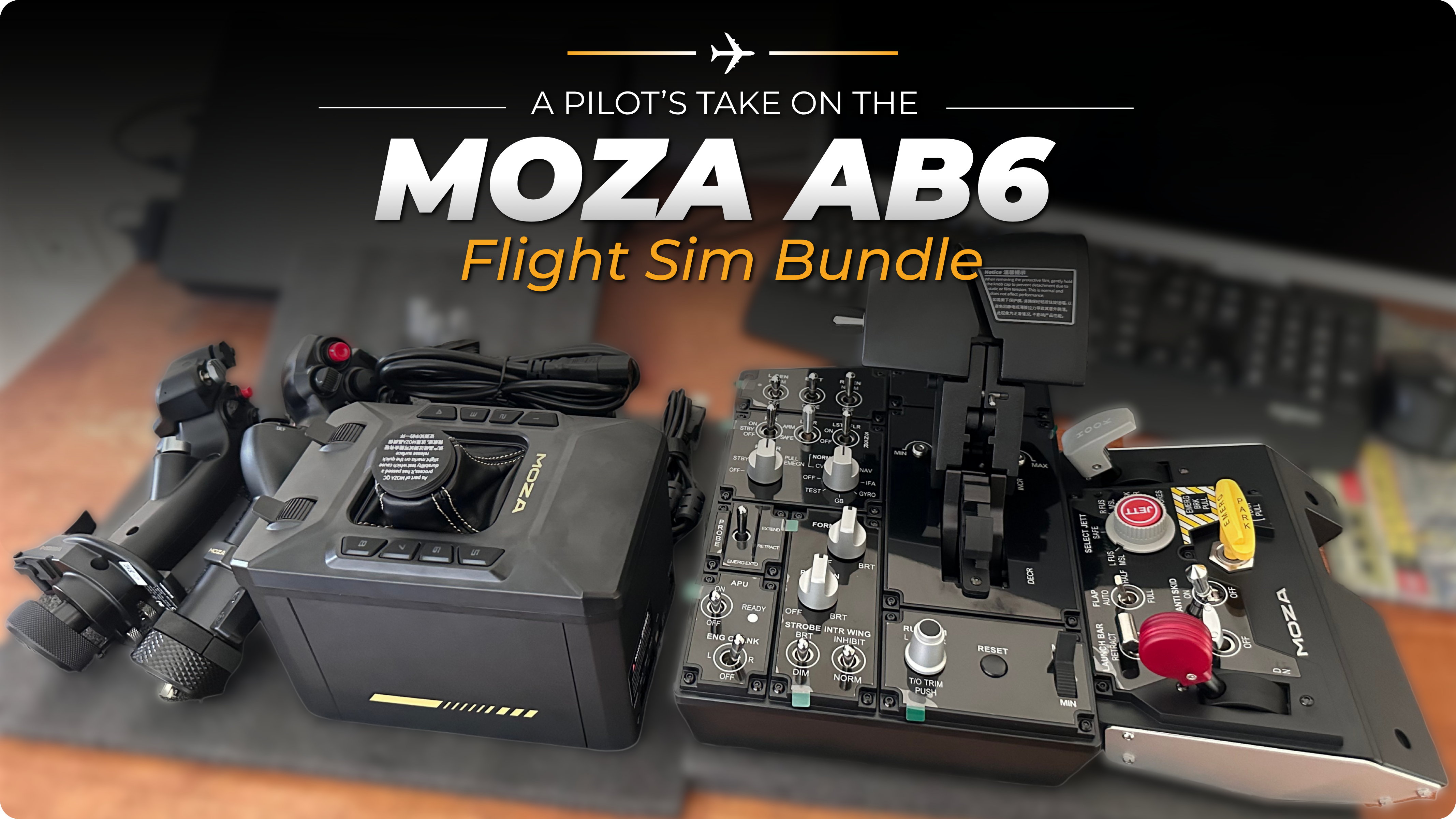
A Pilot’s Take on the MOZA AB6 Flight Sim Bundle

By Dev Lunawat Tue Sep 15, 2026
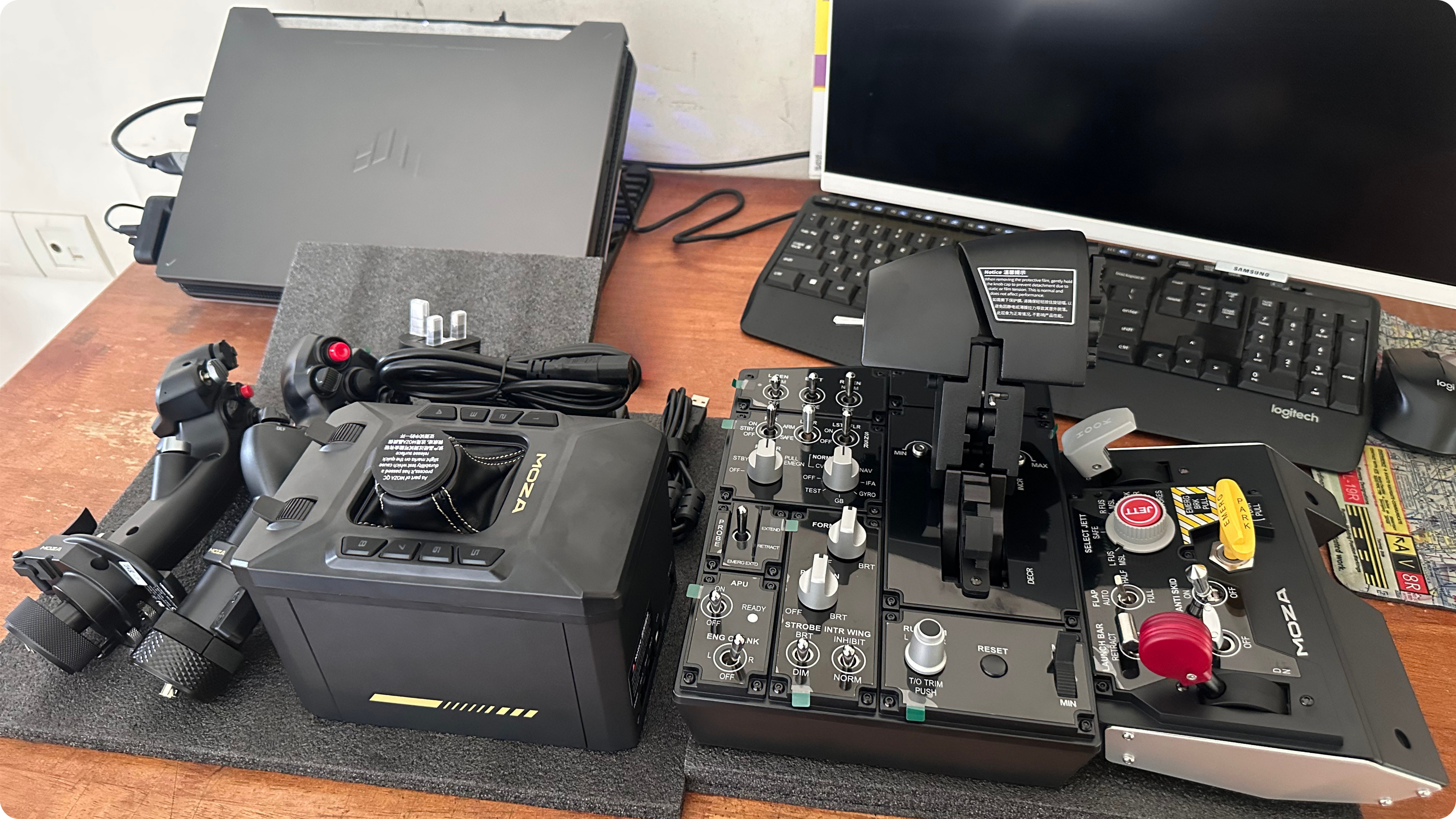
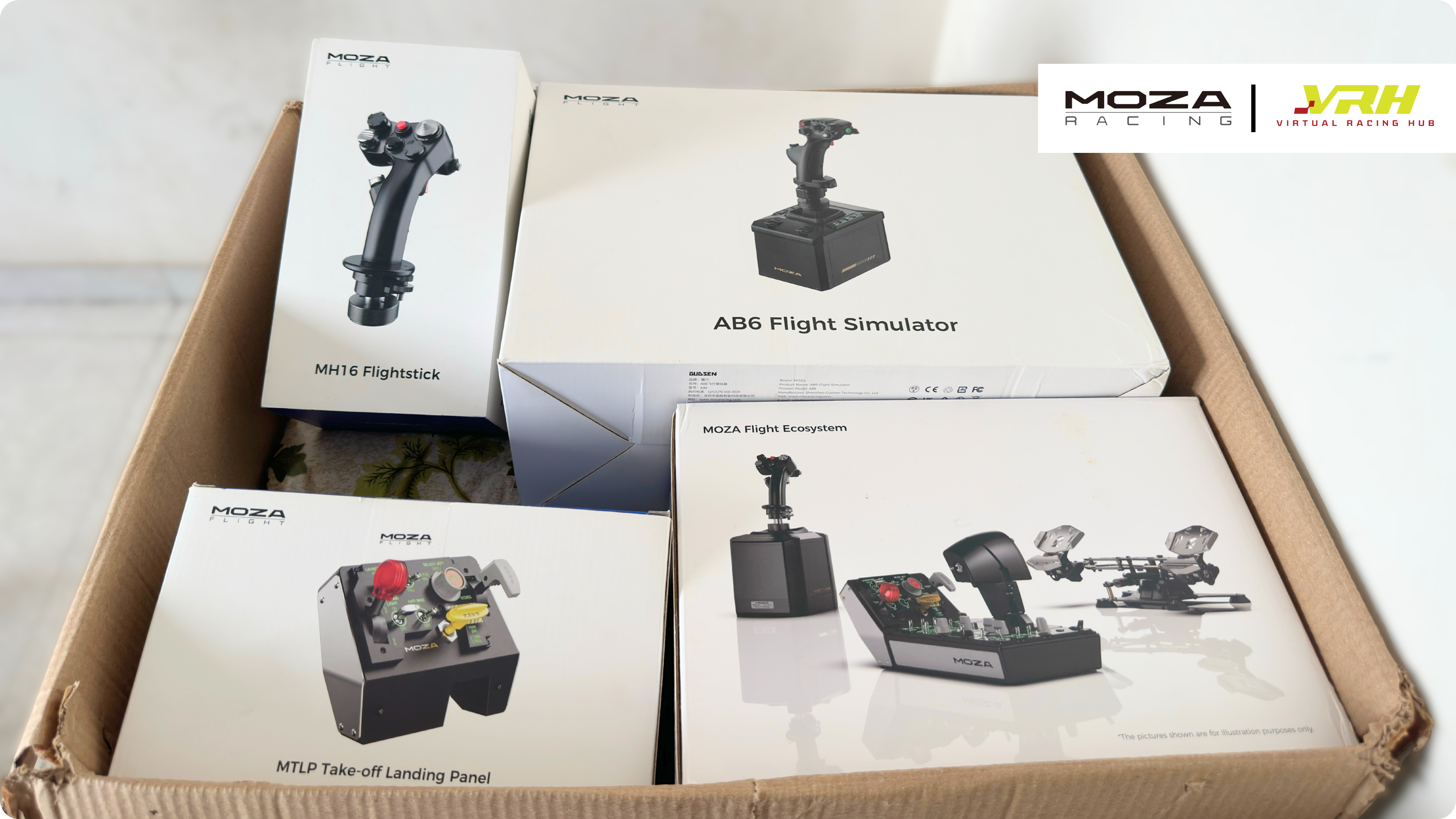
Force feedback flight controls used to belong to home cockpit builders with deep pockets. MOZA's AB6 bundle puts a 6 N·m base, a grip and a desk clamp on sale for US$399, so I flew it the way a commercial pilot approaches a new type: methodically, with a checklist and a healthy suspicion of the brochure. The MH16 grip, the MTP throttle and the MTLP landing panel were tested alongside it.
In the interest of transparency, MOZA Racing supplied all four products free of charge, and Virtual Racing Hub, MOZA's official distributor in India, covered the customs duties, import handling and shipping. No money changed hands, neither company saw this article before publication and every opinion is mine. I have not tested the larger AB9 base; every comparison with it below rests on published reviews by testers who have run both, and I say so where it matters. Prices mentioned are MOZA's US list prices at the time of writing.
Product | Score | In one line |
What force feedback gets right about a real airplane
I flew every hour in my logbook behind a yoke, in the single-engine Cessna 172 and the multi-engine Piper Seneca. Both connect your hands to the control surfaces through cables and pushrods, so the air itself sets the feel. At 60 knots on final the yoke is loose and slightly vague. At 120 knots in the cruise it is heavy and precise, and if you release it on the ground with the engine at idle, the elevator sags under its own weight until prop wash lifts it. A spring-centered joystick knows nothing of this. It pushes back with the same force at 40 knots as at 400, with a bump as you leave center and a load that rises only with deflection, which is the reverse of how an airplane behaves.
Control loading is the most valuable lesson a simulator can teach about energy management, and desktop hardware has ignored it for twenty years. That is the gap MOZA is selling into.
How I tested
The AB6 spent one week on MOZA's included desk clamp, bolted to a solid wooden desk, first with the bundled MHG grip and later with the MH16. Most of the flying happened in Microsoft Flight Simulator 2024 in the Cessna 172, the aircraft I know best in my hands, followed by DCS World in the F/A-18C Hornet, the aircraft the MTP throttle and MTLP panel are modelled on. Where a finding comes from another tester's published work, I say so.
MOZA AB6: build quality and what is in the box
The AB6 is surprisingly larger than its photographs suggest. The base measures 188 x 123 x 163 mm and weighs 2.95 kg, which gives it the density of a well-made camera body. The sides and underside are aluminum, the top plate is plastic and the boot around the stick is stitched leather.
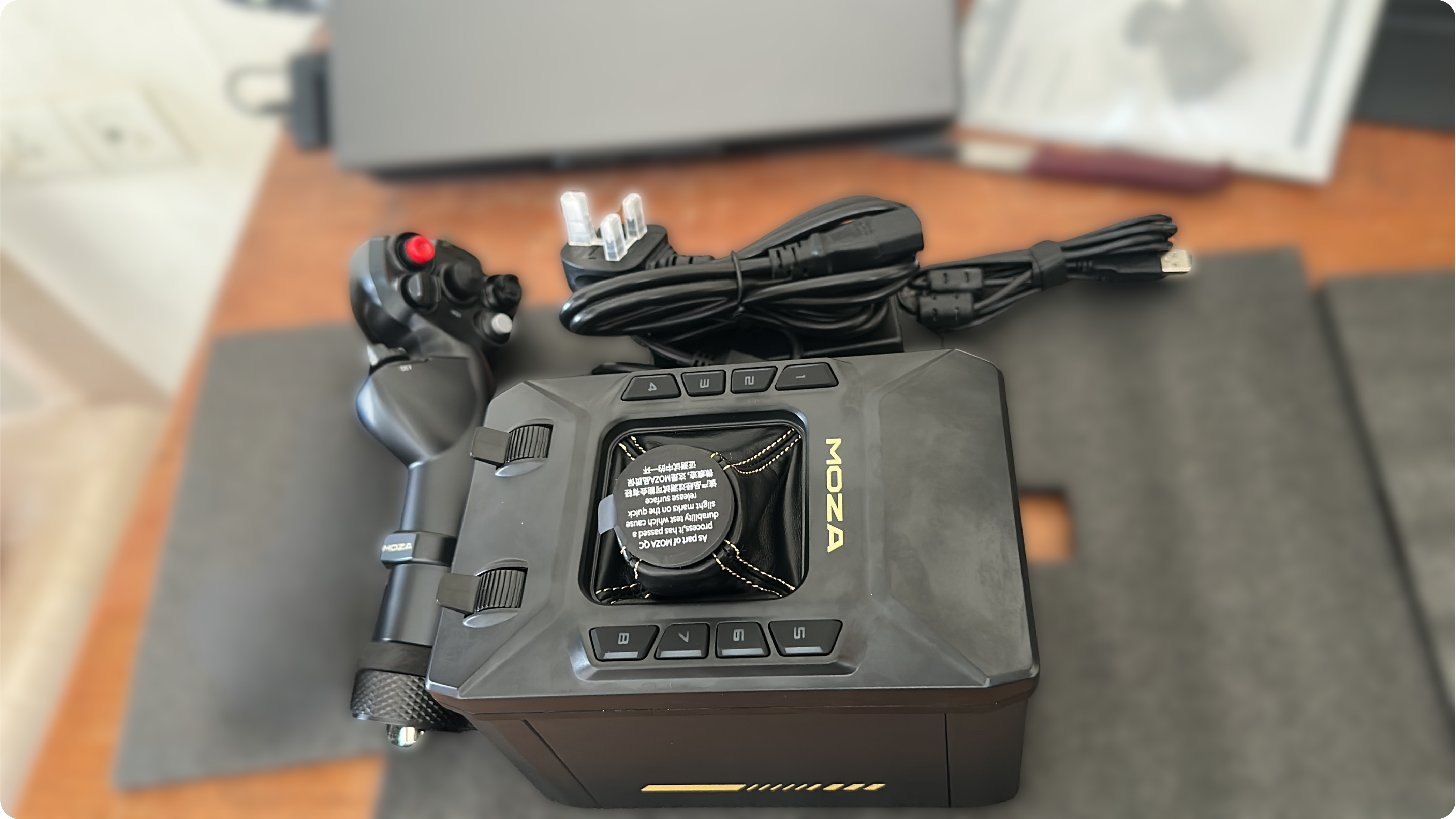
The top plate carries eight rubberised buttons with RGB backlighting that can follow sim telemetry, and two weighted analogue sliders MOZA suggests for throttle, airbrake or zoom. The stick socket uses the M36 threaded collar and mini-DIN connector that Thrustmaster and VIRPIL share, so alongside MOZA's own grips it accepts the Thrustmaster Viper and Hornet grips, the VIRPIL Constellation ALPHA and, through an adapter, WinWing's 16EX. A base that welcomes the grips you already own is a rare courtesy in this market.
Two things trip up new owners: the power button hides under the base on the right, and the stick sweeps through a calibration cycle the moment you press it, so keep your hands clear. My unit also shipped with a UK three-pin plug, so Indian buyers will need an adapter.
The bundled MHG grip weighs 395 g and is moulded from carbon fibre reinforced composite, with three 5-way switches, a 3-way switch, a Hall-effect hat, four push buttons, a two-stage trigger and a twist axis for rudder that ships locked by two grub screws. It is a competent grip more than a luxurious one: the centre push on the 5-way switches needs more pressure than the four directions around it, which cost me a few accidental inputs, a lip on the top right corner catches a finger in long sessions and there is no left-handed version for those of us used to the left seat.
Mounting and ergonomics
MOZA includes the desk clamp with the AB6, which it does not do with the AB9. Two rubber-lined jaws grip the desk edge, a slotted upright sets the height and the base bolts on from below with the supplied Allen key. The screws arrive coated in threadlocker for good reason: force feedback loosens hardware over time, so tighten everything properly and check it again after a week.
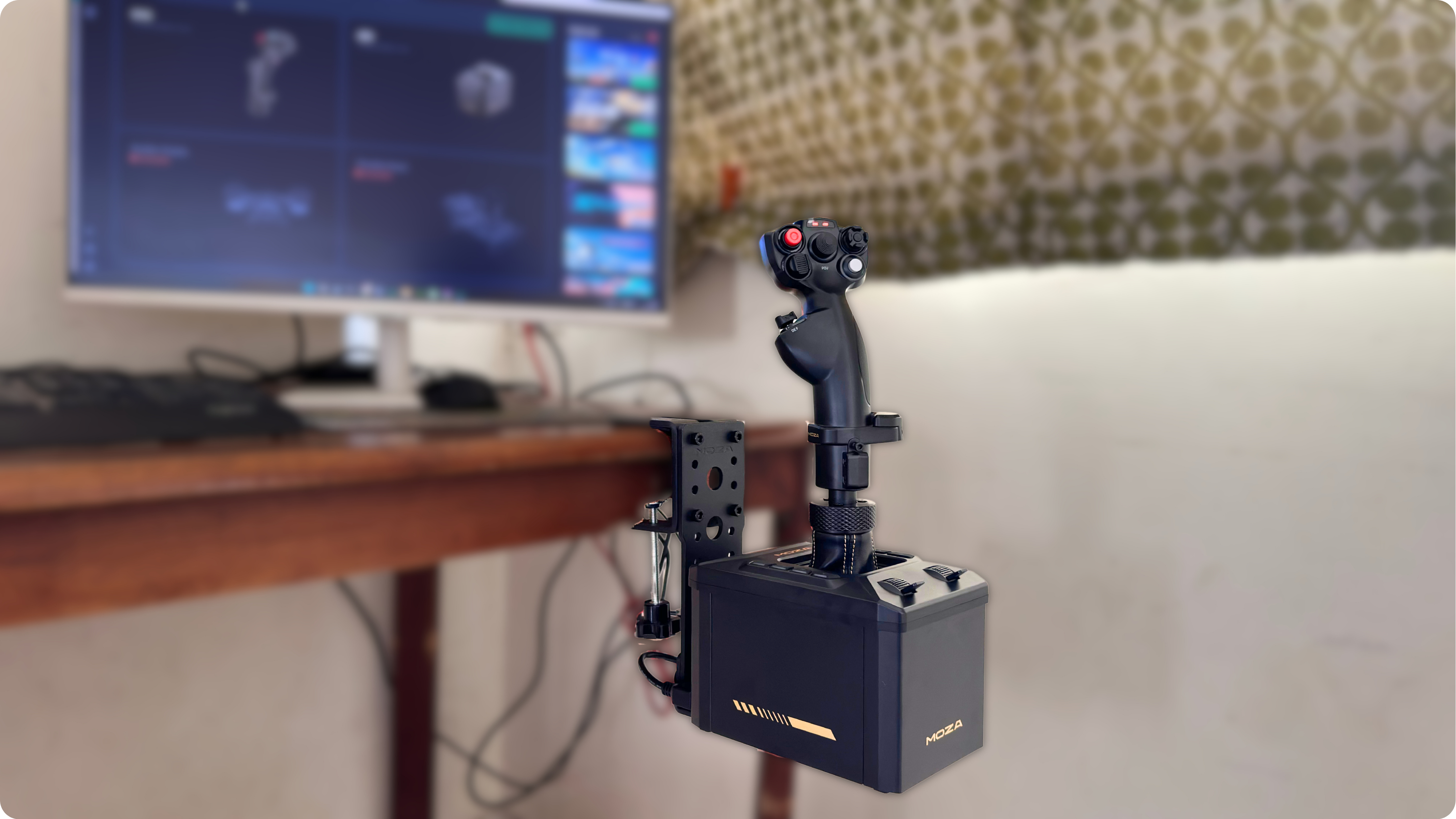
Height matters more than any software setting. On top of the desk the grip sits too high and the wrist does all the work; dropped down the upright until the grip sits where a centre stick would, with the elbow near the knee, inputs get finer and fatigue disappears. The compromise is flex, because the lower the base hangs, the more the arm moves under hard lateral loads. In normal flying I never felt it, but MOZA's gear-shifter mode and aggressive basic fighter manoeuvres expose it, so a rig mount is the answer for either. Leave the USB lead some slack at the rear, where the recommended position pinches it.
MOZA Cockpit software: three ways to make a stick push back
A force feedback base is only as good as the numbers it is fed, and understanding where those numbers come from explains most of how the AB6 behaves in different simulators. MOZA Cockpit can run the base in three modes.
DirectInput: the simulator itself sends force feedback effects to the stick. This is how DCS World works, and the quality depends on the module. Some aircraft push out rich, believable forces and others barely anything.
Telemetry FFB: MOZA reads airspeed, angle of attack, flap and gear state, engine RPM and more from the simulator and calculates the forces itself. This is what carries Microsoft Flight Simulator 2020 and 2024, which do not reliably output native force feedback, and X-Plane through MOZA's plugin.
Integrated: a blend of the two, using telemetry to fill the gaps where the simulator's own effects fall short. This is the sensible default for almost everyone.
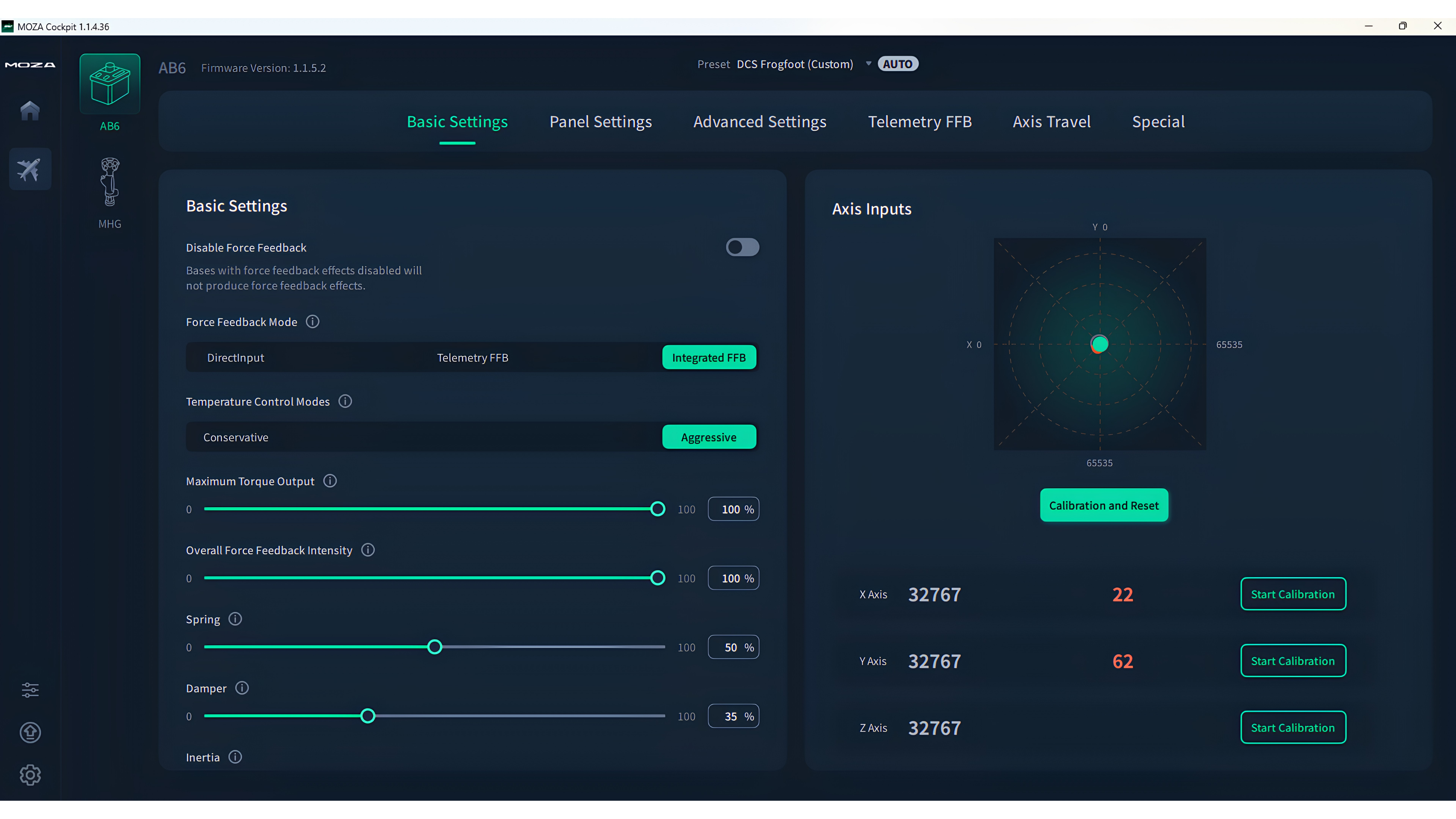
MOZA Cockpit Basic Settings page
The base settings cover maximum torque, overall intensity, separate spring, damper, inertia and friction gains, a temperature cap at 30 or 40 degrees, a cogging torque calibration to run after any grip change and a live force plot. The expert page adds per-axis torque, hardware curves, trim follow so the stick mirrors the simulated control position, a hardware trim mode and grip-removal protection. The telemetry page is where a pilot should spend an evening, because dynamic pressure, elevator droop, stall buffet, ground roll, gear and flap transit, turbulence and gun fire each have a slider of their own.MOZA ships presets sorted by simulator, with a favourites filter, and community presets circulate on the MOZA Discord and Reddit. The weak spot at the time of writing is Microsoft Flight Simulator 2024. Filter the preset list down to this base with its bundled grip and very little is left, so expect to load a 2020 or AB9 preset, then tune it yourself. AB9 presets work on the AB6 but arrive too strong, so pull the spring and overall intensity down before your first flight. One reviewer I follow had the interface freeze during a firmware update and finished the update on a second PC; my own updates went through, but the software is clearly still maturing and MOZA pushes releases often, so read the changelog before you update.
Flying the AB6 as a pilot
I did most of my testing in Microsoft Flight Simulator 2024 with the Cessna 172, because that is the airplane I know in my hands, then moved to DCS World with the F/A-18C Hornet, the aircraft MOZA modelled the throttle on.
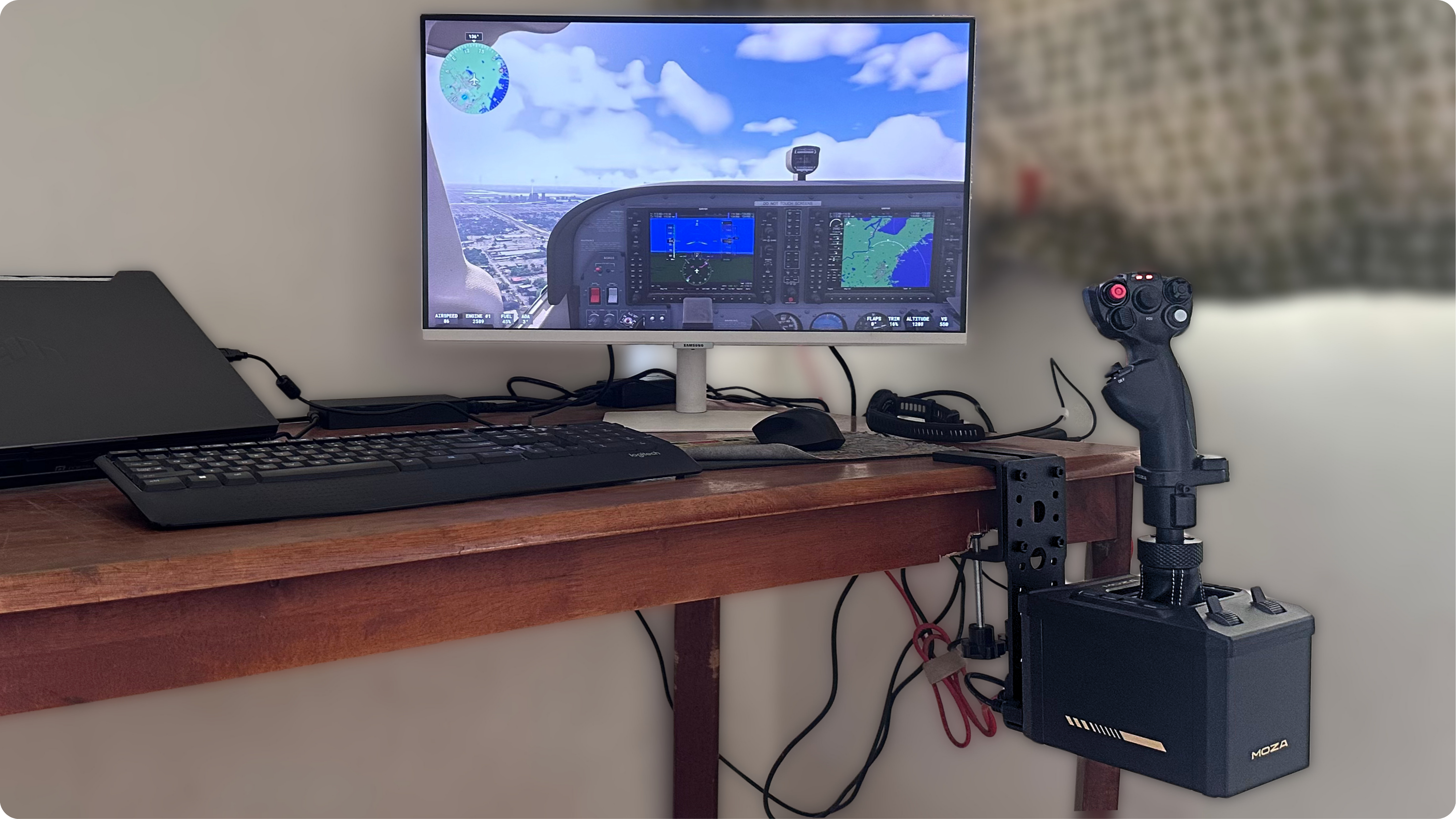
Flying the C172 on MSFS2024 using the MOZA AB6 FFB base and MHG stick
Control loading, at last
The first thing that lands is dynamic pressure. Rolling on takeoff, the stick is light and slightly vague, exactly as a 172's yoke is at 40 knots. As the airspeed winds up through 80 and 100 knots the stick firms up and small inputs start producing small results, which is the one of the many important things this base does. Every spring stick I have used, pushed back the same way at 40 knots as at 140, with a bump as you leave the centre and a force that depends only on how far you move it. An airplane does the opposite, because the force depends on how fast you are going, and the AB6 loads up the way the airplane does, which changes how carefully you fly an approach.
Trim is the second. In the real 172 you trim the pressure off the yoke and the yoke stays where the trim puts it. With trim follow enabled the AB6 does the same: roll the trim wheel and the stick moves under your hand until the pressure is gone. Watching the stick creep forward as you accelerate in the climb is one of the odd small joys of this base. With elevator droop enabled, the stick rests aft while the engine idles on the ground, then lifts as prop wash floods the tail when you add power. Anyone who has done a walk-around and watched the elevator hanging down will smile at that.
Stalls, buffet and the effects that work as cues
Slow the airplane towards the stall and the stick goes progressively softer before a distinct buffet arrives through the grip, a beat before the horn. In a real 172 you feel that buffet through the seat and the yoke together; here it comes only through the hand, but the timing is right and it teaches the same lesson, which is to ease the back pressure before the wing gives up. In the Hornet the same effect turns into a shake that lets you ride the edge of the angle of attack limit in a turn without staring at the HUD.
Some effects are cues more than physics. The thump when the gear comes up, the shudder when the flaps run and the jolt on touchdown are all things a real yoke transmits faintly if at all, and MOZA renders them much larger than life by default. I turned gear and flap vibration down but kept the touchdown jolt, because it makes a firm landing feel appropriately embarrassing. Engine vibration stayed on, since it gives the airplane a pulse at idle while hiding the motor texture. That is the beauty of the telemetry page: what you dislike, you turn down.
Precision, texture and strength
The 15-bit encoder and the absence of any dead zone give the AB6 a precision, no spring stick I have used can match. Formation flying and air-to-air refuelling in DCS, where the corrections are measured in millimetres, become a matter of pressure more than movement. It is also where the AB6's one mechanical compromise shows itself. With engine vibration off, very slow inputs reveal a faint stepping texture from the motors. MOZA's cogging calibration reduces it and any vibration effect hides it completely; in a busy phase of flight I never noticed it. MOZA does not publish the details of the transmission, so I will stick to what I felt: the AB9, the bigger sibling, is smoother at these speeds with double the torque on tap, and that refinement is what you pay the extra for.
On strength, some quick physics helps. Torque is measured at the shaft, and what you feel at the grip is that torque divided by the distance to your hand, so 6 N·m at a grip roughly 15 cm above the pivot works out to about 4 kg of force against your palm. That is plenty for general aviation and more than enough for fighters at the intensity most people run. It also explains why every extension makes a base feel weaker. The AB6 runs out of muscle in two places: the F-16 preset, which tries to hold the stick almost rigid like the real Viper's force-sensing side stick and can be pushed through with one hand, and heavy-handed helicopter flying, where hard lateral loads can overwhelm the motors. The AB9 has a dedicated force sensing mode for the Viper case and the AB6 does not.
Two practical notes. The base produces an audible motor whine during some effects, which the leather boot does little to muffle, and it warms up over a long session, which the temperature control keeps within sane limits. Neither bothered me, but a whisper-quiet rig it is not.
A yoke pilot's caveat
A stick will never feel like a 172 yoke, and I would be lying if I said the AB6 replaced the muscle memory of a yoke's rotation. What it does replicate is the loading behaviour, which is what matters for practising energy management, trimming and stall recognition. If the yoke itself matters to you, MOZA's AY210 force feedback yoke exists for exactly that reason and costs a good deal more. And for all my budget-conscious Airbus pilots out there, the AB6 bundle is what you should get.
Shifter mode
MOZA being MOZA, the base also has a shifter mode. Flip it in the software and the free-floating stick turns into a gated H-pattern or sequential gearbox, with the gates and the shift feel changing from car to car. Bolt on a shift knob and you have a force feedback shifter for the weekend rally stage, though the clamp's flex shows up quickly when you slam through gears. It is a party trick, and I will admit it is a very good one.
Please Note: I have not tested the shifter mode on the AB6 myself.
MOZA MH16 Flightstick review: the grip DCS pilots want
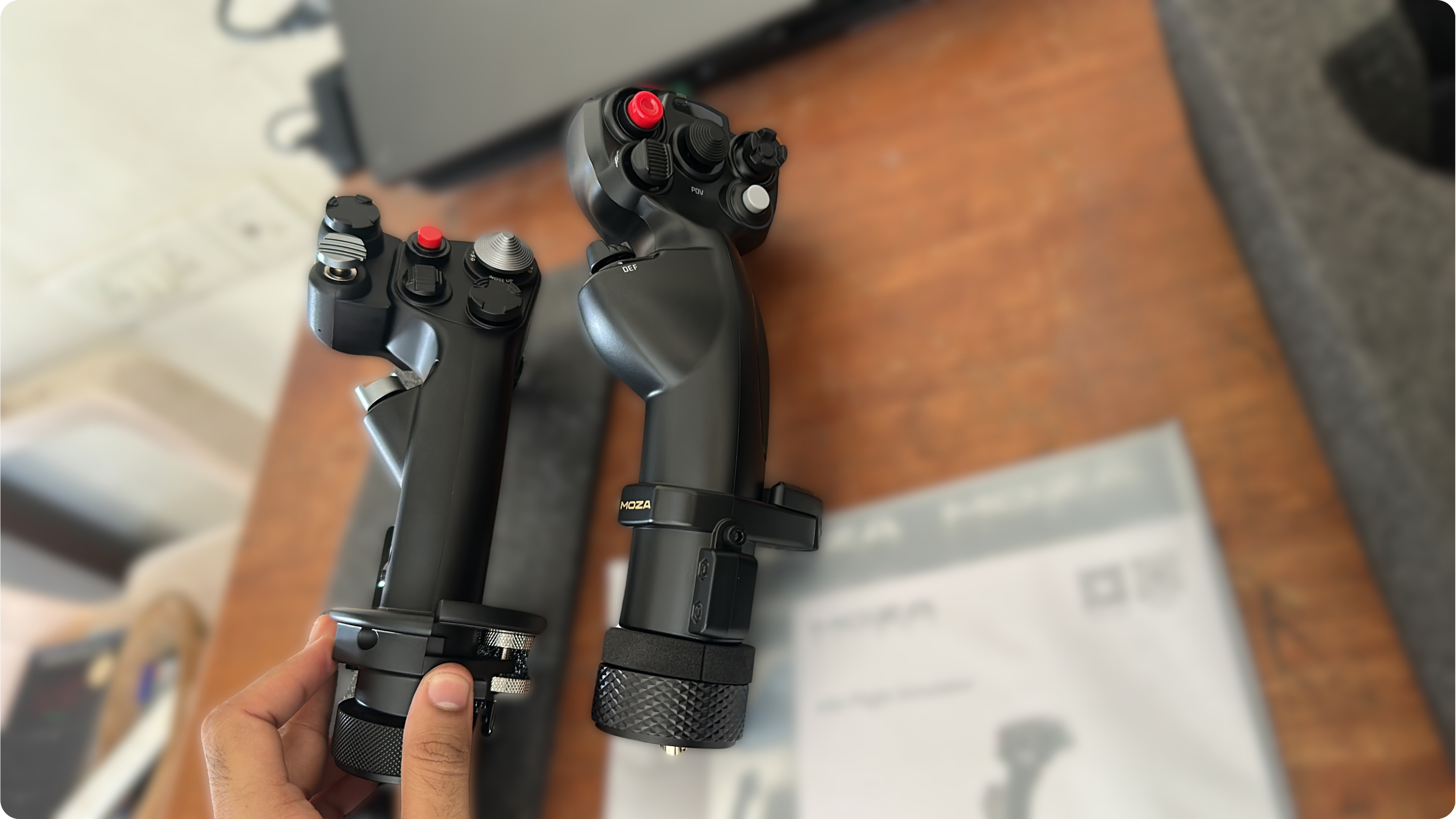
The MH16 is the grip a DCS World pilot wants. Cast in aluminium and finished in automotive paint, it weighs about 540 g, far lighter than a Thrustmaster Warthog grip, which keeps the base from feeling top-heavy under load. The layout follows the F-16C: trim hat plus TMS, DMS and CMS hats on top, a paddle switch, a pinky button, a weapon release button and a two-stage trigger with a firm, well-defined second stage. A pogo-pin module clips onto the front to add a metal two-way switch with an extra hat, the palm rest adjusts for hand size and the grip runs longer than a WinWing Viper Ace. MOZA quotes 27 to 30 inputs depending on the page you read, and the Hornet uses all of them.
The complaints are small but real. The hats are not gated, so an eight-way hat will register a diagonal when you meant an edge, and switching the trim hat to four-way in MOZA Cockpit cures most of it. The TMS switch sits rotated 90 degrees from the real aircraft, which Viper regulars notice within a minute, and some owners report a sticky paddle spring. The 5-pin connector is Thrustmaster-compatible, so the MH16 works on other bases, but there it identifies as a Warthog grip and the extra module and twist axis go dark, whereas on the AB6 every switch, hat and module behaves as intended.
MOZA MTP Throttle and MTLP Panel review: a Hornet's left console
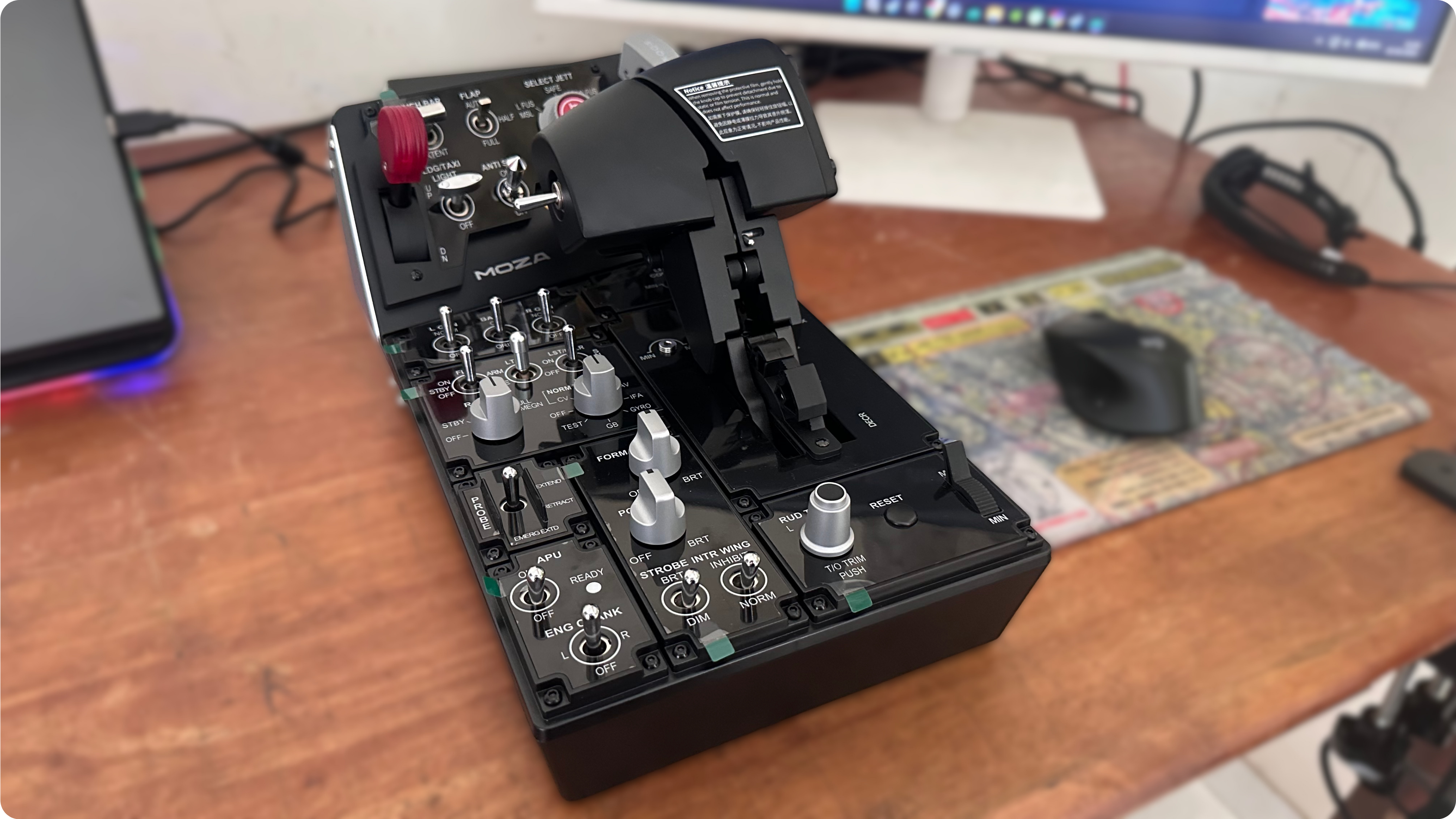
The MTP is an F/A-18 throttle in all but name. The base is composite with aluminium side plates and a glossy, laser-etched top divided into eight panels: APU, engine crank, generator, battery, exterior lighting, radar and sensor switches, rudder trim with a reset, the refuelling probe, fuel controls and a small analogue slider I mapped to zoom. The toggle switches are among the best I have used on any consumer controller, while the six rotary encoders spin without end stops, which suits rebinding better than it suits a lighting knob with a real minimum and maximum.
.png)
The two handles are CNC-machined aluminium and cold to the touch. They travel on a plastic rail through physical detents that reposition with a screw, each with its own tension adjustment, and finger lifts let you step through the gates the way a Hornet pilot pulls through idle to cut-off. The split lever underneath is a small greased pin that takes more fiddling to lock than it should. A 15-bit magnetic encoder and Hall sensors handle the axes, so drift is not a concern.
Two headline features remain works in progress. The built-in vibration motor reproduces engine buffet and the push into afterburner with little else to configure, and the telemetry lighting only fully behaves in the DCS Hornet; in Microsoft Flight Simulator 2024 neither did anything for me. Both are software problems in a product MOZA updates often, so buy the throttle for its mechanics and treat the haptics as a bonus that should mature.
Then there is the footprint. With the MTLP attached and MOZA's optional mounting plate, the assembly needs roughly 430 by 170 mm of desk, the rear panel is a stretch and the whole unit lifts when you pull the parking brake or the gear lever. The suction-cup plate that solves this is a separate purchase of about US$40, and it belongs in the box. Mounted low at your side, where a throttle lives in the real cockpit, every one of these complaints evaporates. An afterburner gate you can feel is the difference between a fighter throttle and a slider, but if you fly airliners or general aviation the Hornet-specific labelling will fight you at every switch, and MOZA's cheaper MTQ quadrant is the better tool.
The MTLP bolts to the back of the MTP with two screws and completes the console: gear lever, tailhook lever, launch bar switch, anti-skid, landing lights, taxi lights, emergency jettison and an aluminium parking brake lever that doubles as the emergency brake, pulling out with a snappy rotating action. The gear and hook levers are pull-to-move, so they cannot be knocked, while Hall sensors on both mean nothing wears. The backlighting is even, and in the DCS Hornet the panel follows the aircraft state, though the translucent gear knob that clearly wants to glow red in transit did not during my testing, which other reviewers have also reported. The launch bar and light switches feel like chromed plastic beside the metal elsewhere, the gloss finish collects fingerprints and each device runs its own cable. The MTLP works as a standalone USB device with other brands' throttles, but it is shaped for the MTP and I would not buy it alone. Together, the pair puts the entire landing checklist under your left hand: gear down without looking, hook down, brakes set.
Specifications
Product | Key specifications | Size and weight | US price |
Buying MOZA flight sim gear in India, with thanks
MOZA supplied the hardware for this review and let me publish what I found without seeing a draft. Virtual Racing Hub, MOZA's official distributor in India, covered the customs duties, import handling and shipping that normally turn an overseas controller purchase into a saga of late invoices, wrong plugs and warranty claims.
The New Delhi based company, which also distributes Simagic, Conspit and VNM Simulation, has spent five years building the Indian sim scene, runs a flagship simulator lounge in the capital and sells the complete MOZA flight range with GST invoicing, a two-year warranty on most products serviced in India and pan-India support. Its prices at the time of writing, taxes included, are ₹69,000 for the AB6 bundle, ₹20,000 for the MH16, ₹49,999 for the MTP, ₹22,499 for the MTLP and ₹75,000 for the AB9 base.
Those figures sit above the converted US prices because duty, GST, freight and a local warranty cost money; import the same hardware yourself and you will pay much of that to customs and the courier with no support at the end. My thanks go to both companies, and if you are in India and this review has you reaching for your wallet, virtualracinghub.com is where to start.
Lastly (and most importantly), a huge shoutout to Airline Ratings for publishing my review.
Verdict
The AB6 bundle makes force feedback a sensible first purchase instead of a luxury. It is compact enough for a desk, complete out of the box and, once MOZA Cockpit is tuned, it teaches the lessons about control loading that a real 172 taught me flying at 3,000 feet over Fort Myers, FL. Its compromises, a faint motor texture, a plastic grip and scanty MSFS 2024 presets, are the ones you would expect at the price and none of them intrude on the flying. The MH16 turns it into a serious DCS World stick for a modest outlay. The MTP and MTLP form a specialised, beautifully switched Hornet setup that needs a rig or a wide desk to shine and a couple more firmware releases to deliver everything printed on the box. If you have been waiting for force feedback to become affordable, this is the moment to buy the bundle, mount it low and find out what an airplane feels like through the stick.
Pros and cons
MOZA AB6 Flight Simulator bundle
Pros
Real force feedback with telemetry effects that model control loading, trim and stall buffet convincingly
Everything in the box, including the desk clamp and a usable grip
Aluminium base with a compact footprint that fits a normal desk
Open stick compatibility with Thrustmaster and VIRPIL grips
Eight RGB buttons and two extra axes on the base
Shifter mode for sim racing
Cons
Faint motor texture at very slow inputs when vibration effects are off
Microsoft Flight Simulator 2024 presets are thin for this base at the time of writing
Can be overpowered on rigid presets and under hard helicopter inputs
Audible motor whine during some effects
Desk clamp flexes under hard lateral loads
MOZA MH16 Flightstick
Pros
Cast aluminium body that feels built for years of abuse
True F-16C layout with a detachable pogo-pin module
Lighter than the Thrustmaster Warthog, so the base stays balanced
Adjustable palm rest
Works on Thrustmaster-compatible bases
Cons
Ungated hats invite diagonal inputs
TMS switch rotated 90 degrees from the real aircraft
Extra module and twist axis disabled on non-MOZA bases
MOZA MTP Throttle
Pros
Some of the best toggle switches on any consumer controller
Smooth, cold, machined aluminium handles with adjustable physical detents
Hall sensors and a 15-bit encoder on the main axes
Flawless, even backlighting
Modular with the MTLP
Cons
Large footprint that needs the separate suction plate on a desk
Rumble and telemetry lighting limited outside the DCS Hornet
Rotary encoders have no end stops
Plastic throttle rails and detents
Hornet-specific labelling makes it a poor fit for general aviation
MOZA MTLP Panel
Pros
Superb parking and emergency brake lever
Pull-to-move gear and hook levers you can operate by feel
Telemetry lighting in the DCS Hornet
Works as a standalone USB device
Cons
Chromed plastic on the launch bar and light switches
Separate cable from the throttle
Little reason to own it without the MTP
Setup guide: MOZA AB6 settings and button mapping for MHG & MH16 flightsticks
Starting points, gathered from MOZA's own support guides, the reviewers I cite and my own tuning.
Adjust one slider at a time, 5 to 10 percent per change, and test in the air. Slider names differ slightly between MOZA Cockpit versions.
Before you fly
Update the base and grip firmware from the upgrade tool in MOZA Cockpit, then run Calibration on the AB6 page and Cogging Torque Calibration on the stick page. Repeat both after any grip or extension change.
With the MHG, run the axis calibration for the Z (twist) axis and the thumb stick separately; the main calibration only covers X and Y. Loosen the two grub screws at the grip's base if you want the twist axis.
Set the temperature cap to 40 degrees, maximum torque to 100 percent and use overall intensity as your master volume.
Force feedback mode: Integrated for both simulators, with telemetry enabled. Confirm the telemetry indicator reads Connected once you are in a flight, not in the menu.
Base panel: leave the eight buttons in button mode, set the two sliders to axis mode and calibrate them by sweeping both through their full travel.
Mount the base as low as the clamp allows, then re-check every screw after the first week for overtime loosening.
Microsoft Flight Simulator 2020/2024 with the MHG grip
In-sim settings
Options, Controls: select each MOZA device and clear the default bindings before you assign anything, which prevents double-bound axes.
Sensitivity: linear curves, dead zone 0, reactivity 100; the base has no play, so add curves only if an aircraft feels twitchy.
Build one general profile for views and a separate profile per aircraft category, then combine them; MSFS lets you run a general profile and an aircraft specific profile together.
MOZA Cockpit: set the MHG thumb stick to button mapping in both mode 1 and mode 2 and switch off "press stick to switch mode", so it behaves as a view hat instead of a stray axis.
Load the MSFS 2024 preset in MOZA Cockpit as your base and save an aircraft-specific copy.
Propeller aircraft (Cessna 172, Bonanza, turboprops, warbirds)
Overall intensity 65 to 75 percent. Spring 45 to 55 percent for cable-controlled aircraft, 60 to 80 percent for warbirds. Damping 20 to 30, inertia 15 to 25, friction 10 to 15.
Telemetry effects: dynamic pressure 60 to 80 (this is the effect that makes the stick stiffen with airspeed, so start high), elevator droop on at 50 to 70, stall buffet 50 to 70, engine and propeller vibration 30 to 40, ground roll 20 to 30, gear and flap 15 to 25, touchdown 40 to 50, turbulence 30 to 40.
Trim follow on, so the stick moves with the trim wheel. Hardware trim mode off unless the aircraft has no trim modelling.
Sliders on the base: left to throttle if you have no quadrant, right to propeller or mixture; with a quadrant, use them for zoom and radio volume.
Jet aircraft (airliners, business jets, fighters)
Airliners and business jets with conventional yokes: overall 65 to 75, spring 55 to 65, damping 35 to 45 to mimic hydraulic feel, inertia 25 to 30, friction 10. Dynamic pressure 30 to 40 (powered controls vary less with speed), elevator droop off, engine vibration 10 to 15, ground roll 20, gear and flap 20 to 30, touchdown 40, turbulence 30 to 40, trim follow on.
Airbus with the MHG or the MA3X side stick (not tested by me): spring 70 to 80, damping 30, dynamic pressure off, elevator droop off, trim follow off, vibration 10 to 15; the real side stick is a spring with no feedback, so the profile should feel like one.
Fighters with conventional sticks (Hornet, Eurofighter add-ons): spring 50 to 60, damping 40 to 50, dynamic pressure 50 to 60, stall buffet 50, engine vibration 15, gear and flap 20.
Fly-by-wire fighters with force-sensing sticks (F-16 add-ons): the AB6 has no force-sensing mode (exclusive to AB9), so run spring 80 to 100, damping 40, dynamic pressure off and a 10 to 15 percent curve, and accept that a firm hand will push through.
MHG button mapping for MSFS 2020/2024 (GA and Jet layouts)
MHG control | General aviation | Jets |
Lower left 5-way switch | Trim: up, down, left, right; press to reset trim | Same |
Base buttons 1 to 8: pitot heat, landing lights, taxi lights, avionics master, fuel pump, carb heat, autopilot heading hold and altitude hold. RGB colours can follow the sim state, so tie gear and lights to their buttons.
Mark at SimHanger publishes ready-made MSFS profiles for exactly this base and grip (all_views, GA_AB6, AB6_GA_THR, heli_ab6 and AB6_Small_Jet); the link sits in the description of his AB6 profiles video, and the layout above follows his scheme so the two can be mixed.
DCS World with the MH16 grip
In-sim settings
MOZA Cockpit: load the DCS World preset, then the aircraft preset (MOZA ships Hornet, Viper, Tomcat and Apache presets among others). MCLS on for fixed wing, off for helicopters.
DCS Options, Misc.: Force Feedback unchecked, because MOZA Cockpit generates the forces from telemetry and the two conflict; switch it on only if you deliberately choose DirectInput mode.
DCS Options, Controls: bind per aircraft. Axis tune for pitch and roll: dead zone 0, saturation X and Y 100, curvature 0 to 15; add a little curvature only if the Hornet feels twitchy at speed.
Clear every duplicate trim binding across devices, otherwise the stick creeps.
Force feedback by aircraft
F/A-18C Hornet: overall 40 to 70 percent (the MOZA preset arrives strong on the AB6, and a working airline pilot I follow settled near 30 to 40), spring 50, damping 40 to 50, dynamic pressure on, stall and angle of attack buffet 50 to 60, gun fire 40, gear and flap 20.
F-16C Viper: MOZA's Force Sensing mode is AB9 only. On the AB6 use the Viper preset, spring 90 to 100, damping 40, curve 10 to 15 percent, and expect to overpower it during hard turns.
F-14 Tomcat, F-4 Phantom and warbirds: spring 0 to 20 for the hydraulic Tomcat, 60 to 80 for warbirds, damping 30, dynamic pressure on, buffet 60, gun fire 50; trim shifts the neutral point instead of snapping back.
Helicopters (Huey, Apache, Ka-50): Helicopter mode on, which removes centring, damping 30 to 40, MCLS off, and bind Force Trim so the cyclic holds where you release it.
Airliner and GA modules: same as the MSFS propeller settings above.
MH16 button mapping for DCS (F/A-18C and F-16C)
MH16 control | F/A-18C Hornet | F-16C Viper |
Base buttons 1 to 8 for the Hornet: gear, hook, launch bar, master arm, flaps auto and half, parking brake, emergency jettison and canopy. With the MTP and MTLP attached, those move onto the panels and the base buttons become lights, radios and the kneeboard.
Base sliders: radar elevation on one, HMD or cockpit view zoom on the other.
The MH16 hats are not gated; set the trim hat to four-way in MOZA Cockpit so diagonal presses stop registering as two trim inputs.
Sources for this guide: Apart from my own trial and error- MOZA's Force Feedback and Telemetry Settings, MSFS 2020/2024 and DCS World support articles; SimHanger's AB6 profiles video; RobAir's MSFS 2024 settings walkthrough; YourSimCFI's DCS review; the Boosted Media AB6 review.
Frequently asked questions
Does the MOZA AB6 work with Microsoft Flight Simulator 2024?
Yes. MOZA Cockpit installs its own plugin and drives the base from telemetry, so you get dynamic pressure, stall buffet, trim follow and engine vibration without waiting for native force feedback from the simulator. Presets for the AB6 in 2024 were sparse when I set up, so expect to tune one yourself.
Is 6 N·m enough torque for a force feedback flight stick?
For general aviation and fighters at normal settings, yes. The base delivers 4.4 N·m continuously on the roll axis and 6 N·m peak, which works out to about 4 kg of force at the grip. It struggles only with rigid force-sensing presets and violent helicopter inputs, which is where the AB9 earns its price.
Can I use my Thrustmaster or VIRPIL grip on the MOZA AB6?
Yes. The AB6 uses the M36 collar and mini-DIN connector shared by Thrustmaster and VIRPIL. MOZA says the base accepts select third-party sticks, and reviewers have confirmed the Thrustmaster F-16C Viper and F/A-18C Hornet grips, the VIRPIL Constellation ALPHA and the WinWing 16EX with an adapter. Some grip functions do not carry over, so check before you buy.
Do I need the MTLP Panel to use the MTP Throttle?
No. The MTP works on its own and connects over USB to any PC. The MTLP adds the gear, hook and brake levers that complete the Hornet layout, and it is a standalone USB device, so it also works with other brands' throttles.
MOZA AB6 or AB9: which should I buy?
The AB6 bundle if you are new to force feedback, fly mostly fixed wing or want everything in one box for US$399. The AB9 if you fly helicopters seriously, want force sensing for fly-by-wire jets or want the smoother, stronger base and are happy to buy the stick and the mount separately.
Does the MOZA AB6 work with X-Plane 12 and DCS World?
Yes. DCS World sends native force feedback through DirectInput, with MOZA's telemetry filling in the gaps, and X-Plane 11 and 12 work through MOZA's plugin. IL-2, War Thunder and Star Citizen are also supported, and the base behaves as a generic joystick in anything else.
Have questions or want to share your thoughts?